VFX Post-Production Workflow: Shot Turnover to Final Delivery

How does a VFX post-production workflow turn a locked edit into invisible, approved visual effects?
A strong VFX post-production workflow is less about one software package and more about clean handoffs. The work begins when editorial, production, and the visual effects team agree what each shot needs, what source material is available, what creative result is expected, and how approvals will be tracked.
Mimic VFX works across film VFX, advertising VFX, game cinematics, music videos, and immersive visual experiences, so the workflow has to support very different schedules without losing craft. This guide follows the practical stages from shot turnover to final delivery and highlights the decisions that keep revisions under control.
Table of Contents
Start with a clear shot turnover

Shot turnover is the moment a sequence stops being only an edit and becomes a production task for the VFX team. The editor or post supervisor sends plates, reference clips, lens notes, frame ranges, handles, retime information, color pipeline details, and a clear creative brief. The more precise this package is, the less time the team spends chasing missing context.
For live-action work, turnover should include clean plates, witness camera material when available, HDRIs, lens grids, camera reports, set photos, and continuity references. For a commercial or music video, it may also include product references, talent approvals, brand safety rules, and notes on what cannot change in the frame.
This is where early supervision pays off. A supervisor who understands the camera plan can help avoid expensive surprises later, which is why Mimic’s guide to film VFX supervision and production planning is useful before the edit reaches post. At the end of turnover, every shot should have a status, owner, target delivery, priority, and approval path.
Build the technical foundation before polish
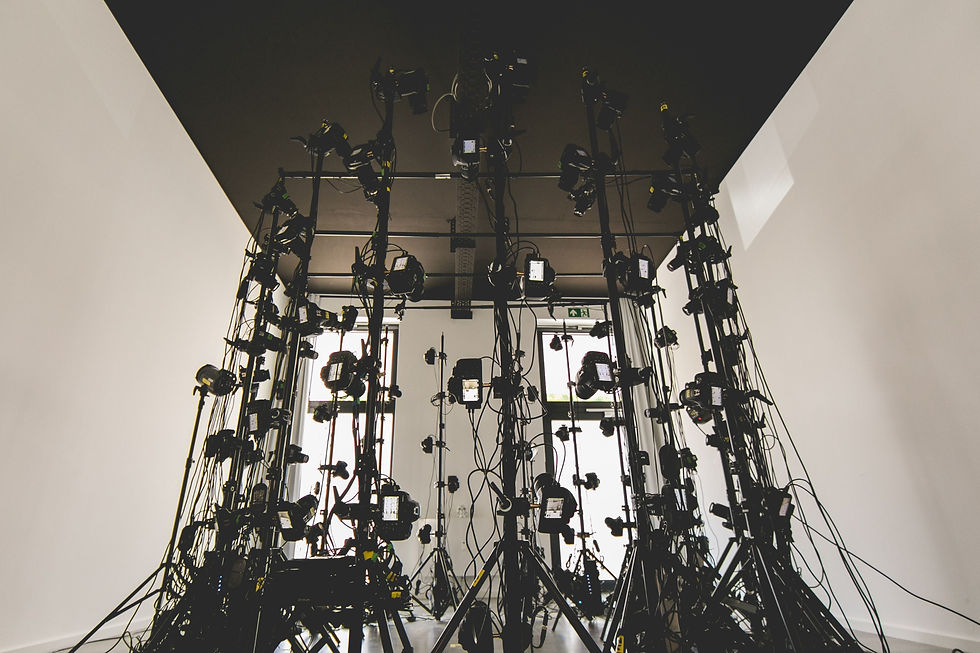
Before a shot looks beautiful, it has to be measurable. Matchmove, tracking, roto, plate cleanup, layout, asset prep, and color management create the foundation for everything that follows. Skipping this stage can make a promising comp feel unstable because shadows slide, perspective drifts, or a digital element does not sit correctly in the plate.
For digital humans, creatures, and character work, the foundation may include motion capture and 3D scanning. For cleanup-heavy shots, it can mean removing markers, stabilizing plates, reconstructing background areas, and preparing mattes before any final look development begins.
This technical pass also helps teams estimate risk. A locked-off screen replacement, a tracked product packshot, and a moving digital double may all be called VFX, but they behave very differently in post. The pipeline should expose those differences early so everyone agrees which shots need more testing, review time, or reference.
Move from CG integration into compositing

Once the groundwork is ready, shots move into the visible creative phase. Animation, simulation, lighting, rendering, cleanup, matte painting, and CG integration are shaped to match the camera, story, and design language. This is where a creature, digital human, impossible environment, product render, or stylized visual moment starts to feel like part of the filmed world.
Compositing brings those layers together. The compositor balances light, grain, depth of field, motion blur, edges, atmosphere, contact shadows, reflections, and color so the audience reads one image rather than separate ingredients. Mimic’s guide to VFX compositing, keying, roto, cleanup, and final integration explains why this stage determines whether a shot feels convincing.
The most efficient workflow does not wait until the final render to ask creative questions. Early slap comps, gray-shaded renders, lighting tests, and low-resolution previews allow directors and clients to react while changes are still affordable. The goal is to separate decisions about performance, composition, and story from late-stage polish.
Use review rounds to protect the creative direction

Review is a system for turning subjective notes into practical next steps. A productive round names the version, shot, frame range, issue, desired change, decision maker, and deadline. Vague notes such as make it pop can be useful in conversation, but they need to become actionable before artists can implement them cleanly.
For character and digital human work, review also protects performance. Small changes to eye direction, skin response, shoulder motion, or timing can change whether a shot feels alive. Mimic’s work with digital humans and digital doubles shows why approvals should cover technical realism and emotional intent.
A reliable review rhythm is predictable: internal artist pass, supervisor pass, client or director pass, then final polish. That sequence prevents incomplete work from creating unnecessary concern, but it still gives decision makers enough visibility to steer the result. For fast schedules, daily reviews are often better than saving up a week of surprises.
Prepare final delivery, QC, and version control

Final delivery starts before the last note is approved. A post-production team should know the required resolution, color space, file format, handles, naming convention, audio reference, delivery folder structure, and approval platform from the beginning. Otherwise, final shots can look approved in a review player but still fail the technical delivery spec.
Quality control checks more than visual taste. Teams look for edge chatter, matte problems, bad grain, missing motion blur, slipping tracks, render artifacts, frame range errors, color mismatches, and inconsistent naming. Commercial work may also require brand, product, or legal review before files are handed to finishing.
For advertising VFX with product renders and digital mascots, final delivery often includes multiple aspect ratios, cutdowns, and platform versions. For film and episodic work, delivery may involve EXR sequences, mattes, pulls, color-managed review movies, and archives that can be reopened if the edit changes.
Plan a smoother VFX post-production schedule

The smoothest VFX post-production workflows are planned backward from the delivery date. Producers should reserve time for turnover, technical prep, first creative passes, supervisor review, client review, final comp, QC, and contingency. A schedule that gives every day to creative work but no time to review or fix delivery issues is not truly realistic.
Different formats need different rhythms. AI VFX can accelerate exploration, but it still needs supervision, cleanup, consistency checks, and final integration. Real-time VFX for game cinematics can speed iteration, but final shots still need lighting, camera, animation, and editorial discipline.
A useful planning rule is to identify the shots that can break the schedule. These are usually hero character shots, heavy cleanup shots, simulation shots, product beauty shots, or anything with unclear creative approval. Give those shots earlier tests and more review time. Easy shots can move later; risky shots need daylight as soon as possible.
FAQ
What is a VFX post-production workflow?
It is the structured process for taking visual effects shots from editorial turnover through tracking, asset work, animation, compositing, review, QC, and final delivery.
When should VFX planning start?
Planning should start in pre-production whenever possible. Early supervision helps capture the right plates, references, lens data, and continuity information before the shoot is over.
What is shot turnover in VFX?
Shot turnover is the handoff from editorial or production to the VFX team, including plates, frame ranges, handles, reference media, notes, and delivery expectations.
Why does compositing matter so much?
Compositing is where layers become one believable final image. It controls edges, lighting, grain, atmosphere, depth, shadows, reflections, and integration.
How many review rounds does a VFX shot need?
Simple shots may need only a few rounds. Hero shots, digital humans, simulations, product beauty work, and heavy cleanup usually need more structured reviews.
Can AI speed up VFX post-production?
AI can help with exploration, enhancement, cleanup, and some production tasks, but final VFX still needs supervision, consistency, compositing, QC, and creative judgment.
What files are needed for final delivery?
Common deliveries include review movies, final renders, EXR or ProRes files, mattes, handles, version notes, and archive material, depending on the project.
How can producers reduce revision costs?
They can reduce costs by locking creative direction early, sending complete turnover packages, reviewing risky shots first, consolidating notes, and avoiding late changes after final polish begins.
Conclusion
A reliable VFX post-production workflow gives creative teams room to experiment without losing control of schedule, budget, or final quality. The strongest results come from clear shot turnover, technical preparation, thoughtful review, careful compositing, and delivery planning that starts long before the final export.
For film, advertising, music videos, game cinematics, digital humans, AI VFX, or immersive work, Mimic VFX can help plan and deliver the pipeline from first brief to final approval. Explore Mimic VFX services and contact the studio to discuss your next visual effects workflow.


Comments